
Six capabilities, one application
NORMAS is one package: every feature comes with every license. NORMAS capabilities follow the natural order of a staffing project: plan, set capacity, choose the method, measure, verify and decide.
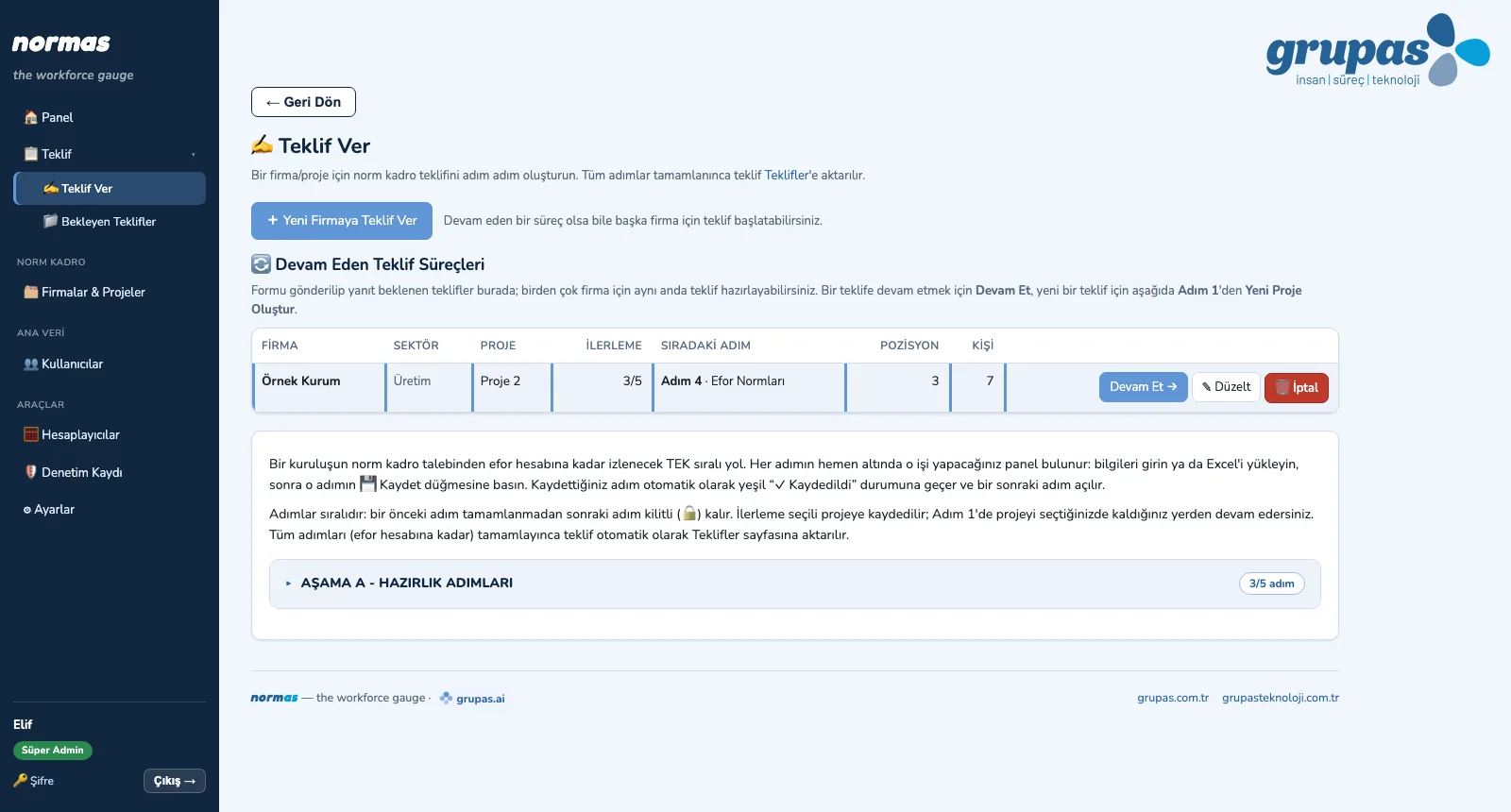
Proposal, Scope and Execution Plan
From a staffing request to an approved proposal and an execution plan.
Explore Set capacityWorking Calendar, Shifts and Allowances
The denominator of the norm: annual effective working time per position, and allowances.
Explore Choose the methodWork Study Measurement Method
The right work study method for each position, matched to the nature of the work.
Explore MeasureWorkload Analysis per Person
Workload analysis, position by position and person by person.
Explore VerifySecond and Third Analysis
Second and Third Analysis for declarations that exceed capacity.
Explore DecideNorm Staffing and Reports
Norm staffing table, savings and reports for management.
ExploreProposal, Scope and Execution Plan
The preparation phase is five ordered steps: company details, blank information form, project scope, effort norms and effort calculation. Once the proposal is approved it moves into execution; positions are assigned to consultants and the GANTT plan is built automatically from the project start date.
- Blank information request form in Excel, with drop-down White / Blue Collar and Shift Pattern columns
- Uploading the completed Excel fills the position list (project scope) with a preview
- Project-specific effort norms and person-day effort per position; effort table as PDF
- Companies & Projects: Lead → Proposal → Project → Completed life cycle
- Execution Plan (GANTT): consultant assignment, automatic scheduling, blocked days; PDF and Excel
- Project team, project roles and position assignments; a consultant edits only the positions assigned to them
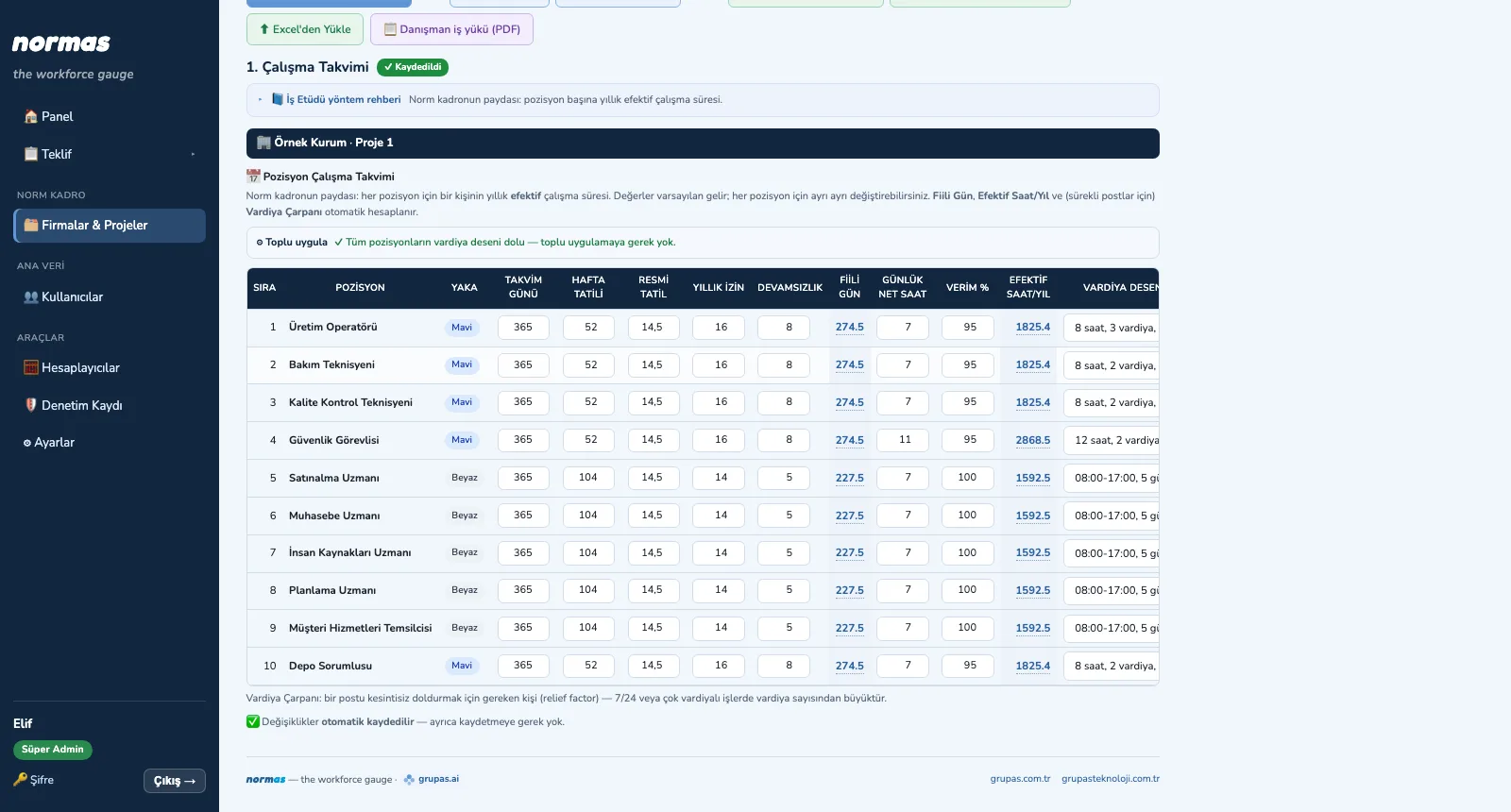
Working Calendar, Shifts and Allowances
Each position's own working calendar is defined in one table: calendar days, weekly rest days, public holidays, annual leave, absence, net daily hours and efficiency. Actual days, annual effective hours and, for continuous posts, the shift factor are calculated automatically. Then rest, personal and delay allowances are assigned to each position.
- Calendar per position: actual days, net daily hours, efficiency → annual effective hours
- Shift pattern library (8/10/12 hours; 5/6/7 days; 1–3 shifts; fixed or rotating rest days)
- Shift factor (relief factor): the number of people needed to fill a continuous post
- Bulk apply: a correctly entered position's calendar is copied in one click to positions with no pattern
- Allowances: rest, personal and delay percentages; ready-made allowance sets; AI allowance suggestion
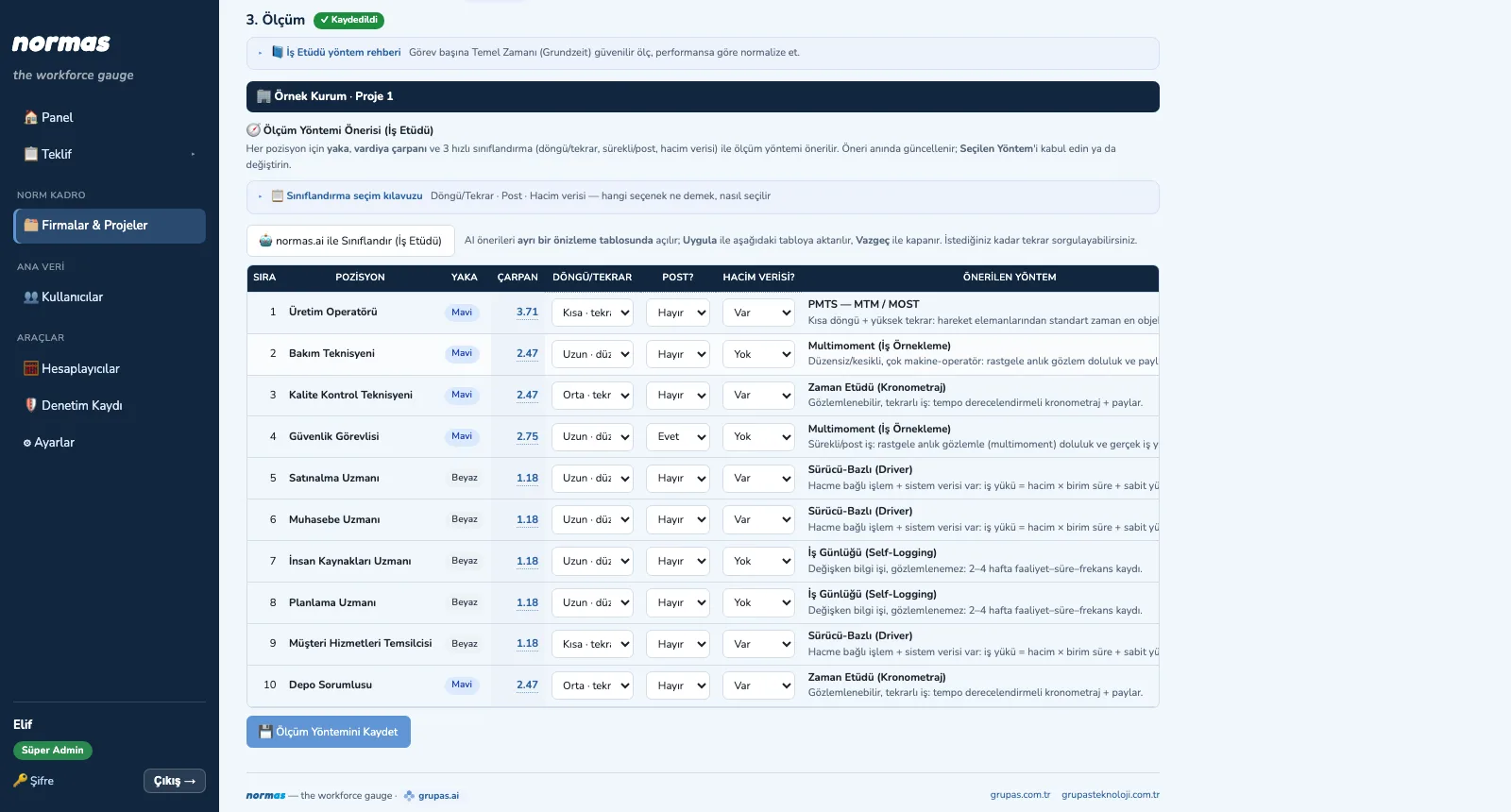
Work Study Measurement Method
Using collar type, shift factor and three quick classifications (cycle / repetition, continuous post, volume data), a primary and an alternative measurement method are suggested for each position, with a rationale. Blue- and white-collar work have their own methods; the work study guide in each phase explains the steps and tools.
- Blue collar: time study (stopwatch), PMTS — MTM / MOST, work sampling, takt and line balancing
- White collar: work log, survey (self-reported), driver-based (volume × unit time), Erlang C
- Post × shift factor for continuous / fixed-point duties
- Classification guide and AI classification suggestion
- Calculators: observations for work sampling, cycles for time study, Erlang C, takt and line balancing
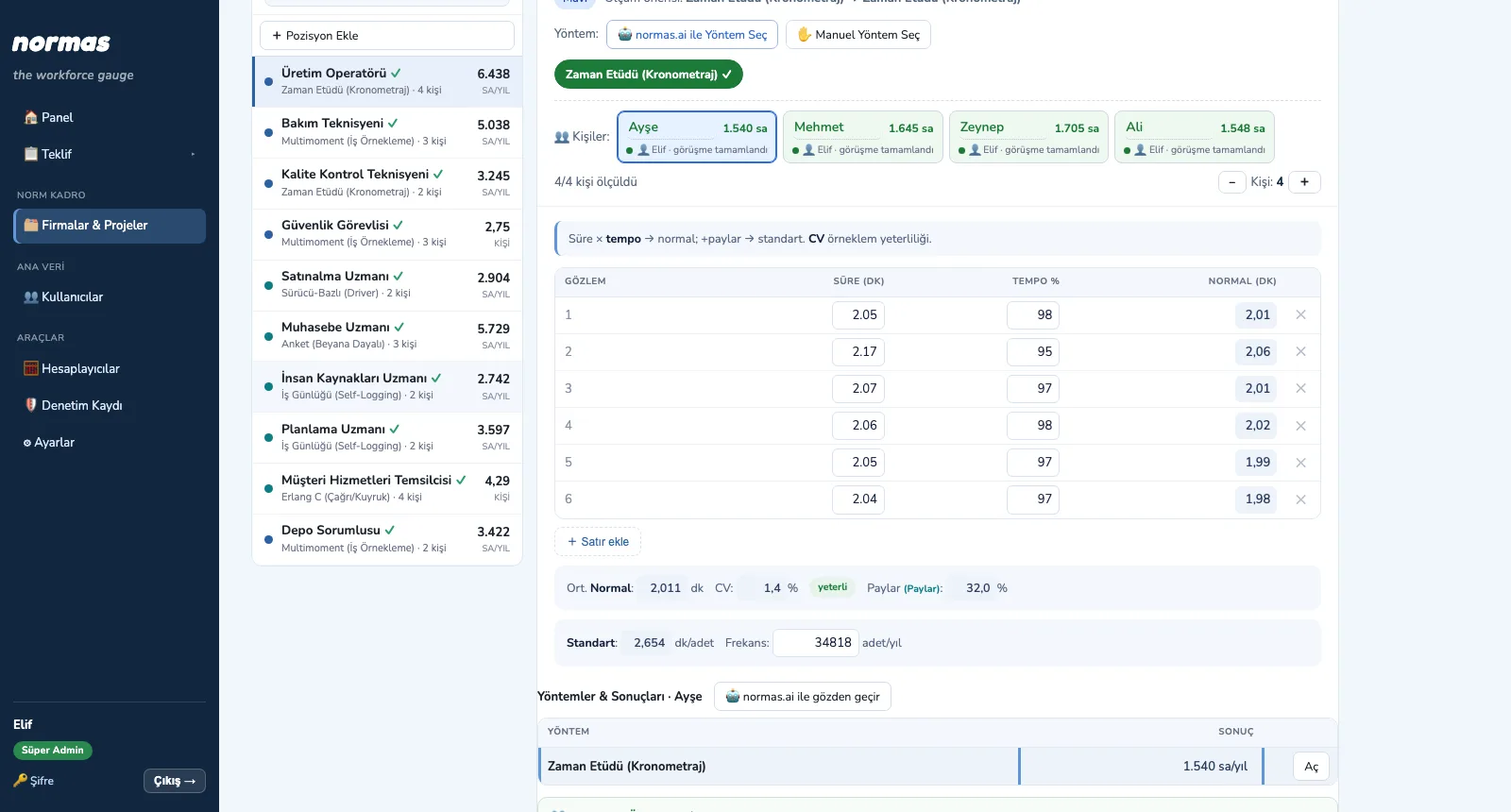
Workload Analysis per Person
Pick a position on the left and the form of the chosen method opens on the right. If a position has more than one person, each is measured separately; the result shows per person and in total. Annual workload comes from standard time × frequency and, divided by effective hours, gives the norm and utilization per person.
- Method-specific forms: observation / rating, TMU, work sampling, activity–time–frequency, volume, queue
- People tabs: each person in a position is measured separately; the position summary shows utilization per person
- Cross-checking with several methods; AI review and a suggested final value
- Consultant comment per person, improvement suggestions per position
- Job description PDFs and an AI consistency / conflict check between analysis and job description
- Automatic saving; positions awaiting analysis as Excel
Second and Third Analysis
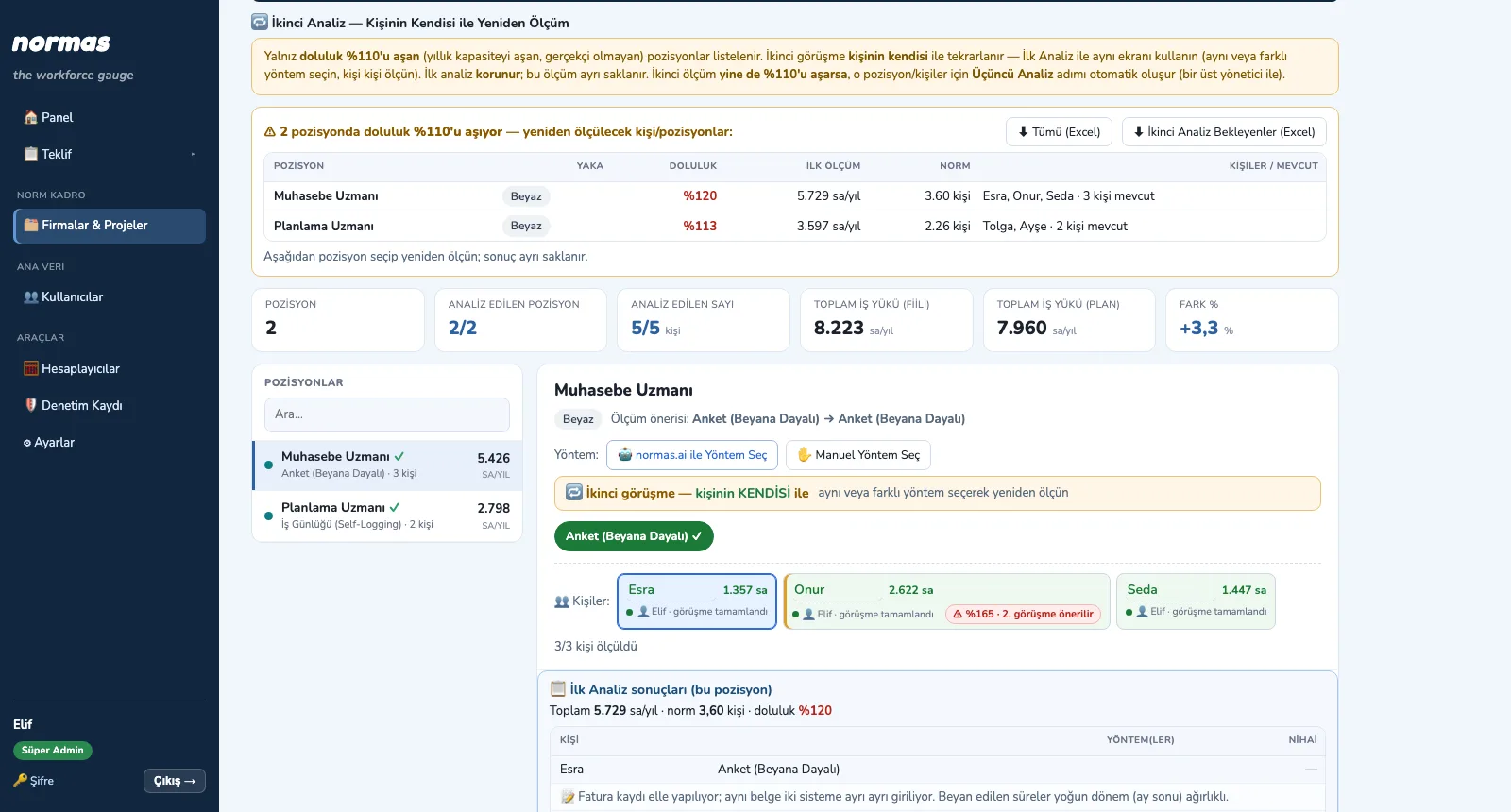
If the workload declared in the first analysis exceeds the position's gross annual capacity by more than 110%, it is not realistic. NORMAS lists these positions automatically: the Second Analysis is a new interview with the person; if the second measurement still exceeds 110%, a Third Analysis with a line manager is created automatically. Each round is stored separately and earlier rounds are kept.
- Overload list: positions and people exceeding gross capacity by more than 110%, with utilization and measurement
- Second Analysis with the person, Third Analysis with a line manager; the same analysis screen
- Previous results panel: total, norm, utilization and person comments of the first (and second) measurement
- AI comparison with earlier analyses and conflict check
- Overload and pending lists as Excel
Norm Staffing and Reports
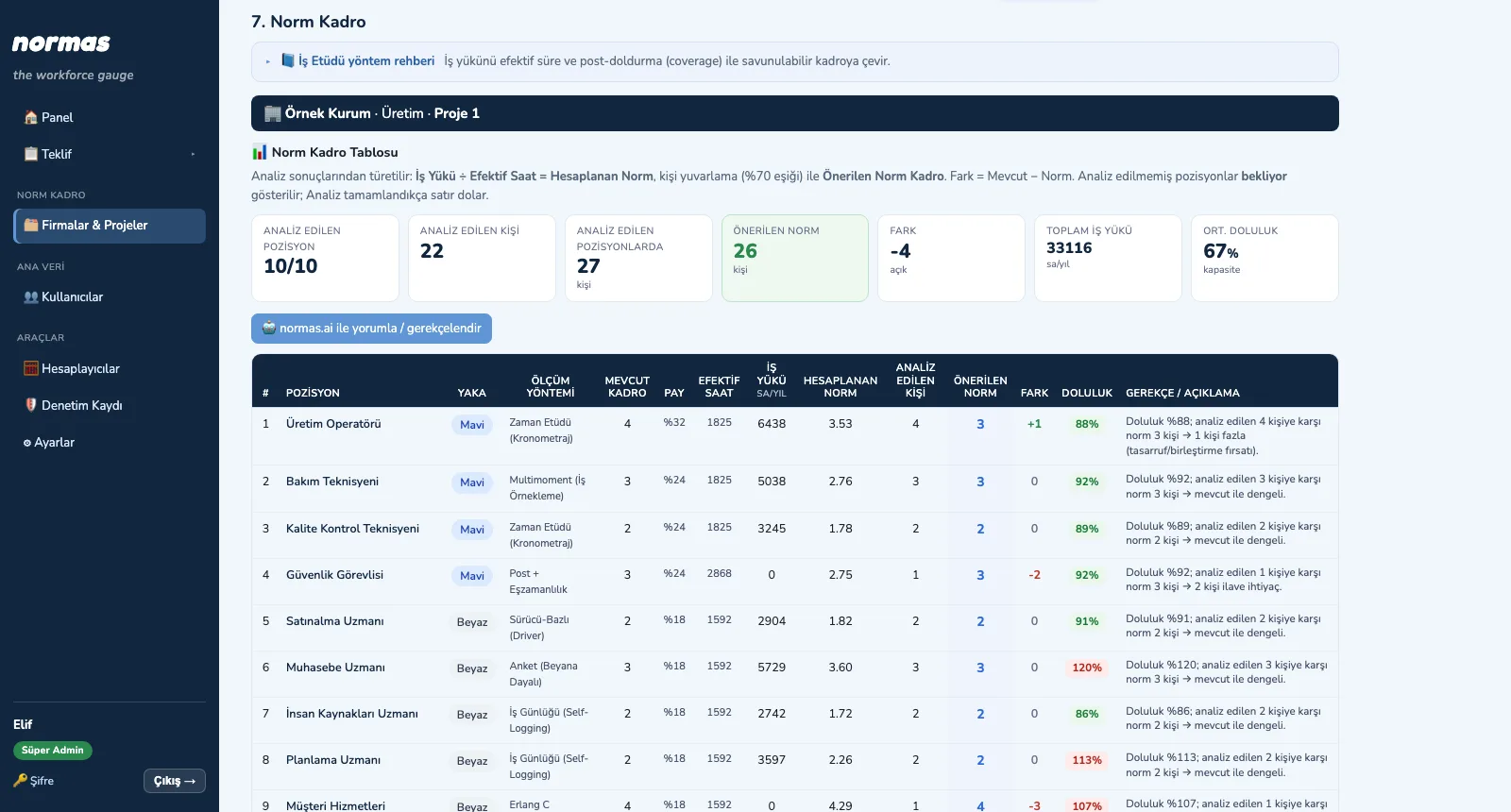
The norm staffing table builds itself from the analysis results: workload ÷ effective hours = calculated norm, the recommended norm with person rounding, the difference to current headcount and utilization. The difference is turned into potential savings with collar-based cost per person. AI interprets the results; outputs download as PDF, Word, Excel and PowerPoint.
- Norm table: current, allowance, effective hours, workload, calculated and recommended norm, difference, utilization, rationale
- Person rounding rule (70% threshold) and utilization bands (below 70% idle, 70–105% balanced, above 105% overloaded)
- Potential savings: difference × annual cost per person by collar type
- AI management assessment and improvement suggestions
- Norm Staffing Report (PDF), Analysis Detail Report (Word), Job Description Status (Excel)
- With AI: Preliminary Report, Management Report (PDF), Muda and Potential Gains (PDF), Final Report (PPTX)
Base your staffing decision on measurement with NORMAS
Write to us for a live walkthrough on sample data.